The Non-Programmer's Quick Guide for Beginning to Build Real Apps with AI in 2025
Quick Start: Which AI Tool Should You Use?
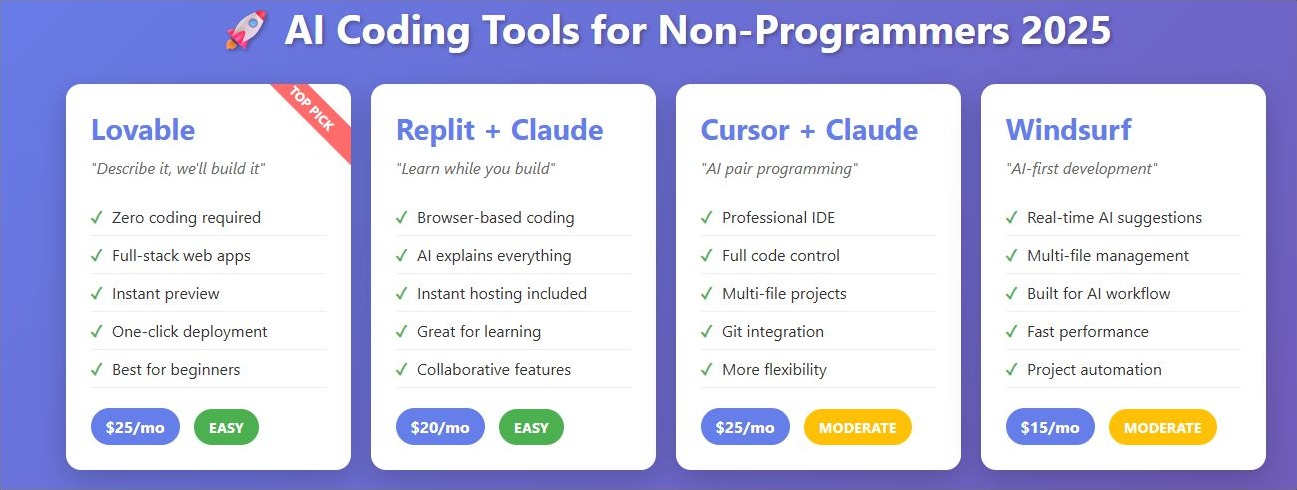
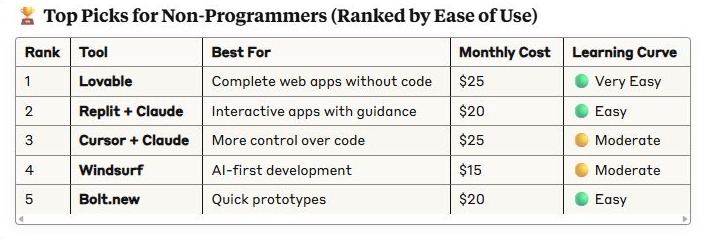
Quick Decision Guide
- Zero coding experience? → Start with Lovable or Bolt.new
- Want to learn while building? → Use Replit with Claude
- Need more control? → Try Cursor with Claude Opus
- Building something complex? → Combine tools (see workflow below)
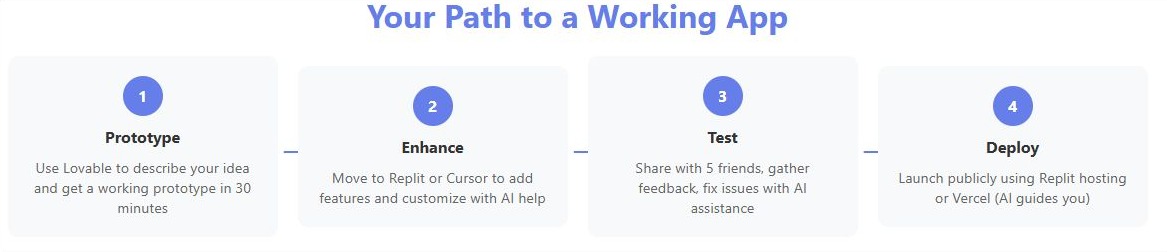
The 3-Step AI Development Workflow
Step 1: Prototype (Day 1)
Use Lovable or Bolt.new to create your initial concept:
- Describe your app in plain English
- Get a working prototype in 30 minutes
- Test basic functionality immediately
Step 2: Enhance (Days 2-3)
Move to Replit or Cursor for refinement:
- Import your prototype
- Add features through conversation
- Claude helps fix issues in real-time
Step 3: Deploy (Day 4)
Launch your MVP:
- Replit provides instant hosting
- Or use Vercel/Netlify (AI will guide you)
- Share with users and gather feedback
10 Essential Tips for Building Apps Without Coding Experience
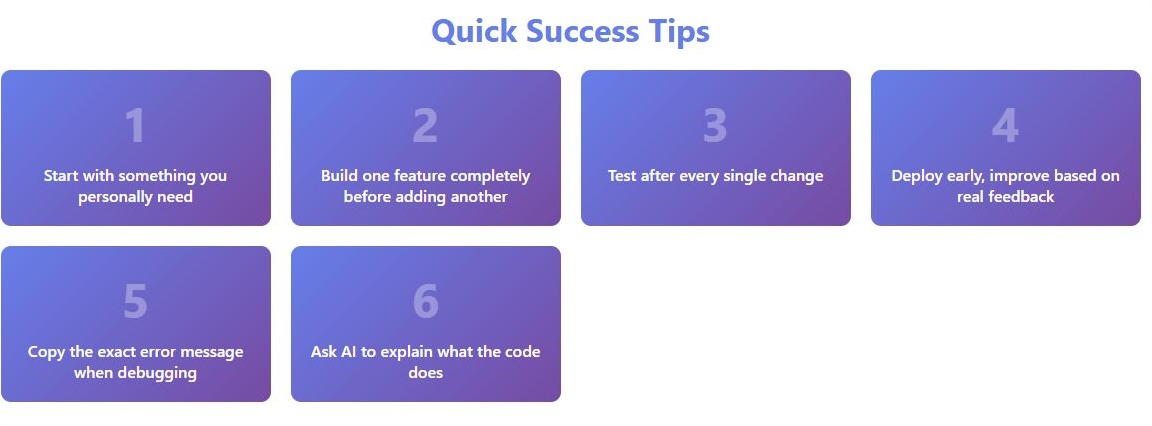
1. Start Stupidly Simple
Do: "Create a to-do list where users can add and check off tasks" Don't: "Build a productivity suite with AI task prioritization and team collaboration"
2. Use Templates as Starting Points
Most AI tools offer templates. Pick one close to your idea and modify:
- "Start with the Twitter clone template, but make it for book reviews"
- "Use the e-commerce template but for digital downloads only"
3. Break Everything Into Tiny Steps
Instead of: "Add user authentication" Try:
- "Add a login button to the homepage"
- "Create a simple login form"
- "Make the login form actually work"
- "Show user's name when logged in"
4. Learn the Magic Phrases
These prompts consistently get better results:
- "Make this mobile-friendly"
- "Add error handling to prevent crashes"
- "Simplify this for better performance"
- "Add comments explaining what this code does"
5. Test After Every Change
- Make one change
- Test it works
- Save/commit (AI tools do this automatically)
- Then make the next change
6. Use Real Data Early
Don't wait. Add real content immediately:
- Real product names
- Actual prices
- True user scenarios This reveals issues faster than dummy data
7. Copy Successful Patterns
Find apps you like and tell the AI:
- "Make the navigation like Airbnb's"
- "Use a card layout like Pinterest"
- "Add filters similar to Amazon's"
8. Focus on Core Features Only
Your MVP needs just 3 things:
- The main action users take
- A way to see results
- Basic user accounts (if needed)
Everything else can wait.
9. Let AI Handle the Boring Parts
AI excels at:
- Form validation
- Database setup
- Responsive design
- Error messages
- Loading states
Focus your attention on unique features.
10. Deploy Early and Often
Get your app online ASAP:
- Use Replit's instant hosting
- Or let AI guide you through Vercel
- Share with 5 friends first
- Fix their top 3 complaints
- Then share wider
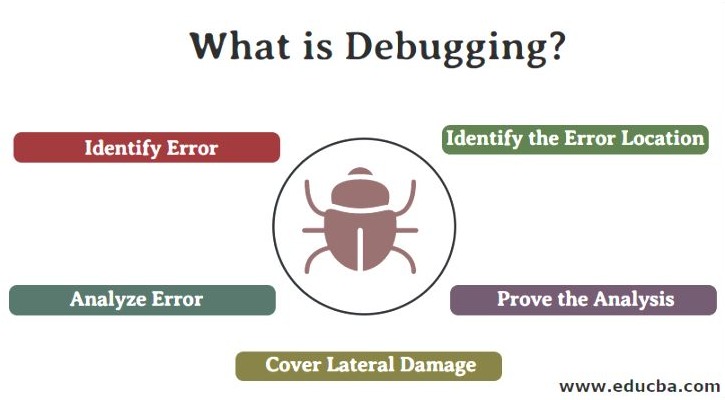
Debugging: Your 10-Point Checklist
When something breaks (it will), follow this order:
1. Copy the Error Message
Paste it directly to your AI assistant. Don't paraphrase.
2. Describe What You Expected
"I clicked the submit button expecting to see a success message, but nothing happened"
3. Share What You Just Changed
"This started after I added the delete button"
4. Ask for Simple Fix First
"What's the quickest fix to make this work?"
5. Request Explanation
"Explain why this happened in simple terms"
6. Test the Fix Immediately
Don't accumulate fixes. Test each one.
7. Check Browser Console
AI will guide you: Press F12 → Console tab → Screenshot any red text
8. Simplify If Needed
"Can we make this feature simpler so it's less likely to break?"
9. Add Logging
"Add console.log statements so I can see what's happening"
10. Know When to Restart
If you've tried 3 fixes and it's still broken, sometimes starting fresh with that component is faster.
Common Pitfalls and How to Avoid Them
❌ Pitfall: Trying to build everything at once
✅ Solution: Build one feature completely before starting the next
❌ Pitfall: Not saving working versions
✅ Solution: Use version control (Replit/Cursor do this automatically)
❌ Pitfall: Ignoring AI warnings
✅ Solution: When AI says "this might cause issues," listen
❌ Pitfall: Copy-pasting without understanding
✅ Solution: Always ask "explain what this code does"
❌ Pitfall: Building for perfection
✅ Solution: Ship at 70% perfect, improve based on feedback
Real Examples: From Idea to Launch
Example 1: Local Business Directory
Day 1: "Create a directory where businesses can list their info"
- Used Lovable to generate basic structure
- Added business name, address, phone fields
Day 2: "Add search functionality"
- Moved to Cursor
- Claude helped add search by name and category
Day 3: "Make it look professional"
- Asked for "modern, clean design like Yelp"
- Added map integration
Day 4: Launched on Replit
- Shared with 10 local businesses
- Fixed mobile display issues they reported
Example 2: Personal Budget Tracker
Day 1: "Simple expense tracker with categories"
- Bolt.new created basic add/view expenses
Day 2: "Add monthly summaries"
- Used Replit to add charts
- Claude helped calculate totals
Day 3: "Add export to Excel"
- Asked AI for export functionality
- Tested with real expense data
Day 4: Deployed and shared
- Friends requested recurring expenses
- Added in 30 minutes with AI help
Advanced Techniques (Once You're Comfortable)
Combining AI Models
- Use Claude for complex logic
- Use ChatGPT for UI/UX suggestions
- Compare outputs for best results
Prompt Chaining
Instead of one big request:
- "Create the data structure"
- "Now create forms to add data"
- "Now display the data in a table"
- "Add sorting to the table"
Context Management
- Keep a document with your app's purpose
- Paste it at the start of new conversations
- Include current features list
- Mention known issues
Resources and Next Steps
Free Learning Resources
- Replit's 100 Days of Code - Daily AI coding challenges
- Cursor's YouTube Channel - Video tutorials
- Claude's Documentation - Prompt engineering tips
Communities
- r/AICoding - Reddit community for AI-assisted development
- Replit Discord - Real-time help from community
- IndieHackers - Share your progress, get feedback
When to Get Human Help
Consider hiring a developer for 2-4 hours when:
- Integrating payment systems
- Setting up user authentication properly
- Optimizing for thousands of users
- Adding complex integrations
Final Advice: Just Start
The biggest mistake is overthinking. Your first app will be imperfect—that's the point. Each project teaches you more about working with AI. Start with something you personally need, keep it simple, and ship it fast.
Remember: Every successful app started as someone's messy first attempt. With AI tools in 2025, your path from idea to reality has never been shorter. Stop reading, start building.
Your First Project Challenge
Build one of these in the next 48 hours:
- Habit Tracker: Check off daily habits
- Recipe Saver: Store and search recipes
- Gift List: Track gift ideas for friends
- Book Notes: Save quotes and thoughts from books
- Workout Log: Track exercises and progress
Pick one. Open Lovable or Replit. Type what you want. Start building. You've got this!
Advanced Appendix
🚀 You've Made it. The Eagle Has Landed
A Minimum Viable Product Launch Checklist & Debugging Guide - The American Way
Pre-Launch Checklist (Complete in Order)
✅ Core Functionality
- Main feature works without errors
- Users can create accounts (if needed)
- Data saves and loads correctly
- Basic navigation works on all pages
- Forms show success/error messages
✅ Mobile Testing
- Test on phone browser
- Buttons are tappable (not too small)
- Text is readable without zooming
- Forms work with mobile keyboard
- No horizontal scrolling
✅ Performance Basics
- Pages load in under 3 seconds
- Images are optimized (AI can help)
- No console errors (Press F12 to check)
- Works on slow internet (test with throttling)
✅ User Experience
- Clear what the app does in 5 seconds
- Obvious how to get started
- Error messages are helpful, not technical
- Loading states for slow operations
- Can recover from mistakes (undo/cancel)
✅ Data & Security
- Passwords are hidden when typing
- Users can only see their own data
- Test with 10+ items (does it slow down?)
- Delete functions have confirmation
- Backups enabled (most platforms do this automatically)
🐛 More Bugs

Common Bugs & Quick Fixes
Bug: "Nothing happens when I click the button"
Quick Fixes:
- Ask AI: "Add console.log to see if button click is detected"
- Check: Is the button inside a form? (May need preventDefault)
- Try: "Simplify this button to just show an alert first"
Bug: "Data disappears on refresh"
Quick Fixes:
- Ask AI: "Save this data to localStorage"
- Or: "Set up proper database storage"
- Quick test: "Just hardcode some sample data for now"
Bug: "Works on computer but not phone"
Quick Fixes:
- Ask AI: "Make this mobile-responsive"
- Specific: "Increase button sizes for mobile"
- Check: "Remove any hover-only interactions"
Bug: "Users see each other's data"
Quick Fixes:
- URGENT: Take app offline temporarily
- Ask AI: "Add user authentication check before showing data"
- Verify: "Ensure database queries filter by user ID"
Bug: "App crashes with many items"
Quick Fixes:
- Ask AI: "Add pagination showing 20 items at a time"
- Or: "Implement virtual scrolling"
- Quick fix: "Limit to 100 items for now"
🚀 Deployment Steps
Option 1: Replit (Easiest)
- Your app is already hosted!
- Click "Share" → Get link
- Custom domain: Settings → Domain ($7/mo)
Option 2: Vercel (Professional)
Ask AI to guide you:
- "Help me deploy this to Vercel"
- "Create a vercel.json configuration"
- "Fix any build errors for Vercel"
Option 3: Netlify (Good for Static Sites)
- "Prepare this for Netlify deployment"
- "Create netlify.toml file"
- Drag & drop to Netlify dashboard
📊 Post-Launch Monitoring
Week 1 Priorities
- Fix Crashes First: Any error that stops the app
- Mobile Issues: 60% of users are on phones
- Confusing UI: If 3+ people mention same issue
Gathering Feedback
Simple feedback form to add:
"Hey! Thanks for trying [App Name]. Quick question:
- What's one thing that confused you?
- What feature would you add next?
- Would you recommend this to a friend? Why/why not?"
Analytics (Ask AI to Add)
- Page views
- Button clicks
- Error tracking
- User drop-off points
🔧 Emergency Fixes
"The app is down!"
- Don't Panic - Check hosting platform status
- Revert - Go back to last working version
- Communicate - Post update on social media
- Fix Forward - Once stable, carefully add changes
"I broke everything!"
- Version Control Saves You - Replit/GitHub have history
- Rollback - "Restore to yesterday's version"
- Branch Protection - "Create a test copy before major changes"
"Users are angry!"
- Acknowledge Fast - "We hear you and are fixing it"
- Fix Critical Only - Don't add features during crisis
- Update Often - "Fixed X, working on Y"
- Learn - Document what happened for next time
🎯 Success Metrics for MVPs
Good Signs (Keep Going!)
- 10+ people use it without major issues
- Someone you don't know signs up
- Users request specific features (they care!)
- 1+ user uses it daily
- Someone offers to pay
Warning Signs (Pivot Needed)
- Only friends use it (and stop after day 1)
- Confused feedback ("What is this for?")
- Technical issues overshadow value
- You dread working on it
- No clear next feature request
💡 Pro Tips from Failed MVPs
- Ship at 70% Perfect - Users will tell you the other 30%
- One Amazing Feature > Ten Mediocre Features
- Real Data Day 1 - Dummy data hides problems
- Support Channel - Even just an email address
- Version 2 Planning - Keep a list but don't build yet
🎉 You Launched! Now What?
Week 1-2: Stabilize
- Fix only crashes and confusion
- Gather all feedback in one place
- Thank early users personally
Week 3-4: Analyze
- What feature do users actually use?
- What do they ignore?
- What do they request most?
Month 2: Iterate
- Build the #1 requested feature
- Remove unused features
- Improve onboarding based on confusion points
Month 3: Decide
- Growing steadily? Keep building
- Plateau? Try marketing push
- Declining? Pivot or move on
Remember: Most successful apps were terrible at launch. Instagram started as Burbn (a check-in app). Twitter was a podcasting platform. Your MVP is just the beginning of the journey!